

Powered by Versioning Machine v3
This text has 7 versions
Display New VersionBack to List of TextsBibliographic Information
Display Line Numbers   •  Note Format  
Need help?

Bibliographic InformationX

"Faith is a fine invention"

by Emily Dickinson

Original Source:

See Witness List.

Witness A660: A 660, verse embedded in letter to Samuel Bowles.
Witness H201: H 201, fascicle version of poem.
Witness H72: H 72, fascicle version of poem.
Witness P1891: Published as poem XXX in the second volume of Todd and Higginson's Poems of Emily Dickinson. ()
Witness L1894: Letter to Samuel Bowles published in Todd's edition of Dickinson's letters.
Witness CP: Published as poem LVI in Martha Dickinson Bianchi's Complete Poems of Emily Dickinson. ()
Witness LL: Letter to Samuel Bowles published in Bianchi's The Life and Letters of Emily Dickinson. ()

Textual Notes: Electronic Edition Information
Text encoding by Jarom McDonald.
Proofing by Lara Vetter

This poem is available only for demonstration purposes. It was created as part of a research project to experiment with ways of displaying multiple witnesses of a TEI-encoded poem using XML, XSLT and JavaScript.


Encoding Principles

Test document for versioning machine project. Marked-up collation of three manuscript witnesses: A 660, H 201, and H 72, and four early print witnesses: Poems (1891)--XXX, Letters (1894)--p. 191, Complete Poems (1924)--LVI, and Life and Letters (1926)--p. 227.

DTD constructed from TEI prose base with tagsets for linking, figures, analysis, transcr, textcrit.


X Version
View ImagesView ImagesView Images
1 "Faith" is a fine invention
1 Faith is a fine invention
1 "Faith" is a fine invention
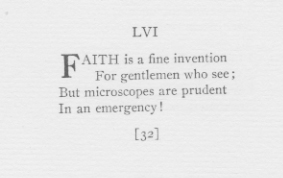
1 FAITH is a fine invention
1 Faith is a fine invention
1 FAITH is a fine invention
1 Faith is a fine invention
2 When Gentlemen can see -
2 For Gentlemen who see -
2 For Gentlemen who see !
2 For gentlemen who see ;
2 For gentlemen who see ,
2 For gentlemen who see ;
2 When gentlemen can see !
3 But Microscopes are prudent
3 But microscopes are prudent
4 In an Emergency .
4 In an Emergency !
4 In an Emergency !
4 In an emergency !
4 In an emergency .
4 In an emergency !
4 In an emergency !
X Notes
About the Image and Note ViewerX

The image and note viewer may be dragged anywhere within the browser window. It is closed by clicking on the X button. Only one image and one popup note can be viewed at a time.

Because of a limitation in the way the browser handles XSLT transformations, users of Firefox and other Mozilla-based browsers cannot view images within untransformed XML documents. In order to view manuscript images in Firefox, it is recommended that readers use HTML versions of the text. This restriction applies only to the image viewer: the note viewer work across all browsers.

About Version ControlsX

Each witness functions independently of each other. The first two witnesses are opened in the VM by default and displayed according to the order established by the editor/encoder. Users can open further witnesses through the Display New Version button. Witnesses can then be displayed in any order via the pull down menu. The X button removes the current version and resizes the remaining versions to maximize available space. All but one version can be removed.

About Note DisplayX

The Display Notes menu provides three choices for viewing notes when viewing texts encoded using the parallel segmentation method, and two when viewing texts encoded as discrete witnesses. In both cases, the default displays notes in a JavaScript popup whenever the reader clicks upon the footnote icons. When viewing parallel segmentation-encoded texts in Internet Explorer and Firefox, there is also the option to display all notes simultaneously within an inline panel. Lastly, there is an option to hide all notes.

About Line NumberingX

The Show Line Numbers checkbox toggles the display of line numbers on and off. Proper display of line numbers depends upon the TEI encoding of the document. This option is only available for documents that have been encoding using the parallel segmentation method.

To track the changes in a line across witnesses, click the line number before the start of the line. To remove the bolding, click the line number again.